
Overview of BuildNow GG
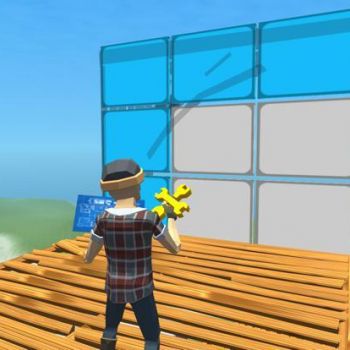
BuildNow GG is a free online building game that can be played directly in a web browser. The title invites players to create structures, experiment with design, and enjoy a sandbox environment without the need for downloads or installations. The game is hosted on a site that specializes in casual browser experiences, making it accessible from most modern computers and tablets. Its simple premise encourages creativity and offers a relaxing way to pass time while testing architectural ideas. Because the game runs in a browser, it is suitable for quick sessions or longer building projects.
Getting Started in BuildNow GG
When you first open the game, you will be presented with a clear workspace and a set of building tools. The interface is designed to be intuitive, allowing new players to begin constructing almost immediately. Take a moment to explore the toolbar, which typically contains options for selecting different building blocks, adjusting size, rotating pieces, and undoing recent actions. Experiment with each button to understand how the elements interact with the grid. If the game includes a preview mode, use it to see how your structure will appear before finalizing any changes.
Understanding the Interface
The main screen is divided into a central canvas and a side panel that houses the building options. The canvas represents the area where you place blocks and shape your creation. The side panel may include categories such as basic shapes, decorative pieces, and environmental items. Hovering over an icon often displays a brief description, which can help you decide which element fits your design best. Look for any icons that indicate saving or loading, as these features allow you to preserve your work and return to it later.
Basic Building Techniques
Start with a solid foundation by placing larger blocks at the base of your structure. Building upward becomes easier when the lower layers are stable. Use the rotate function to align pieces precisely, especially when creating corners or intricate patterns. If the game offers a grid snap feature, enable it to keep blocks aligned and avoid gaps. When you make a mistake, the undo button is a valuable tool that lets you revert the most recent action without losing the entire project. Practice placing blocks in different orientations to become comfortable with the spatial dynamics of the game.
Strategies to Enhance Your Creations
Developing impressive builds in BuildNow GG often involves planning and attention to detail. Before you begin, consider sketching a rough layout on paper or in a simple drawing program. This pre‑planning step helps you allocate space for each component and reduces the need for extensive revisions. Incorporate a variety of block types to add texture and visual interest. Mixing simple shapes with more decorative elements can give your structure depth and character.
Planning Your Layout
A well thought out layout starts with a clear purpose. Decide whether you want to construct a towering skyscraper, a cozy cottage, or an abstract sculpture. Allocate sections of the canvas for different functional areas, such as living spaces, decorative zones, or open plazas. Keep pathways clear to maintain a sense of flow within the design. If the game includes a zoom feature, use it to fine tune details that may be difficult to see from a distance.
Adding Details and Finishing Touches
Once the main structure is complete, focus on adding finishing touches that bring the creation to life. Small decorative blocks can be placed along edges to simulate trim or molding. Consider adding environmental pieces such as trees, benches, or lighting if they are available. These elements not only enhance the aesthetic but also create a more immersive experience. Take time to review the entire build from multiple angles, adjusting any sections that appear out of proportion.
Community and Replay Value
BuildNow GG benefits from a community of players who share their creations and exchange ideas. Many browser based game sites feature galleries where users can upload screenshots of their builds. Visiting these galleries can inspire new techniques and provide fresh design concepts. Because the game does not impose strict objectives, each session offers the freedom to start a new project or improve an existing one. This open ended nature ensures that the game remains engaging over many playthroughs.
Frequently Asked Questions
Is BuildNow GG compatible with mobile devices?
The game runs in a web browser, so it can be accessed on most smartphones and tablets that support modern browsers. Performance may vary depending on the device hardware and screen size.
Can I save my builds for later?
The interface typically includes options to save or export your work. Look for icons that represent saving or downloading, which allow you to preserve your creations and revisit them in future sessions.
Do I need an account to play?
Most browser based building games do not require registration. You can usually start playing immediately, though creating an account may provide additional features such as cloud saving or access to community galleries.
What are the best ways to improve my building skills?
Practice regularly, experiment with different block combinations, and study designs shared by other players. Planning your structures before building and using the undo function to correct mistakes also help develop proficiency.
Is there a limit to how large a structure can be?
The size of the building area is defined by the game’s canvas. While there may be a maximum grid size, most players find that creative designs can be achieved within the provided limits.